
How to Install and Use Claude Code Skills: Complete Step-by-Step Guide
Learn how to install, configure, and manage Claude Code skills using SKILL.md. Step-by-step setup for personal, project, and team agent workflows.
AicodePro Team
VERIFIED AUTHOR
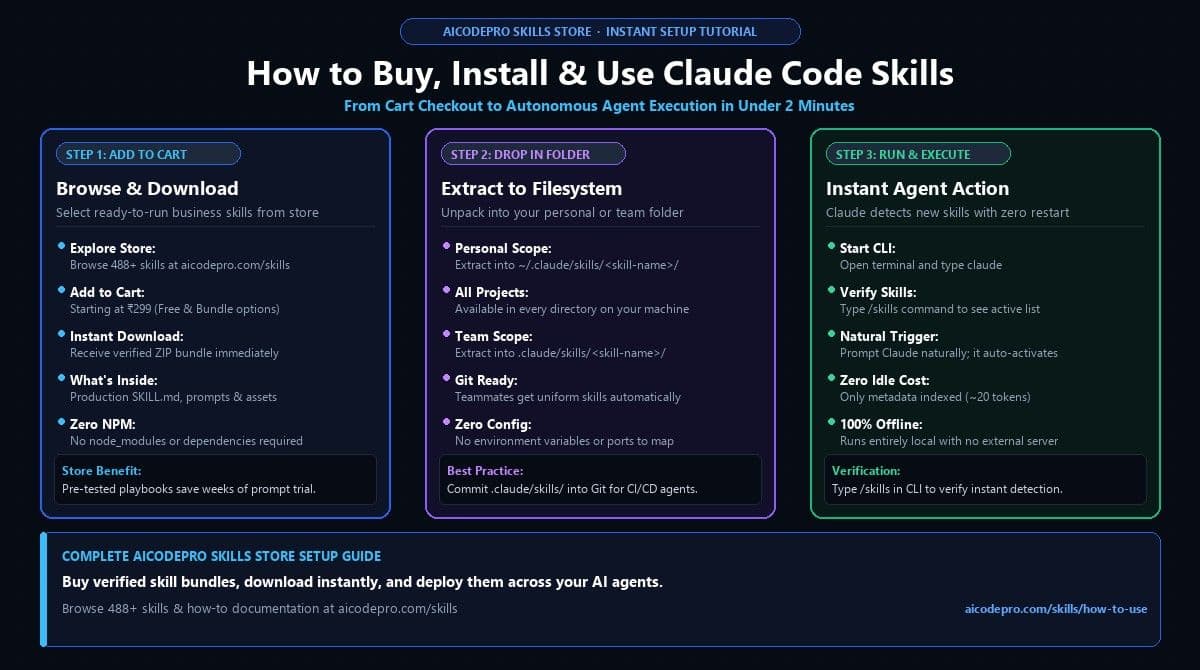
Direct Answer: To install Claude Code skills, browse the AiCodePro AI Skills Store, select your desired skill (e.g., AI Answer Visibility Audit or Abandoned Cart Sequence), click Add to cart (starting at ₹299), and download the verified ZIP bundle. Then extract the folder into ~/.claude/skills/ (for personal use) or .claude/skills/ (for team projects). Claude Code detects and activates the skill automatically with zero server configuration.
- Instant Download: Purchase verified skills on the AiCodePro Store starting at ₹299. No complex git commands required.
- Dual Scope Control: Place in
~/.claude/skills/for machine-wide access or.claude/skills/to commit into your Git repository for team sync. - Zero Runtime Dependencies: Skills contain plain
SKILL.mdinstructions. Nonpm install, no background daemons, and 100% offline execution. - Instant CLI Verification: Type
/skillsinside the Claude Code CLI to view all active skills and their descriptions. - Explore More: Check our 15 Best Claude Code Skills Directory to find the highest-impact skills for your business.
Personal Scope vs Project Scope Comparison
Claude Code supports two distinct operational layers. Here is how they compare:
| Dimension | Personal Scope (~/.claude/skills/) | Project Scope (.claude/skills/) |
|---|---|---|
| Storage Location | User home directory (machine-wide) | Repository root (project-bound) |
| Availability | Active in every terminal session on your computer | Active only when working inside that repository |
| Team Sharing | Private to your personal machine | Committed to Git so teammates and CI runners sync |
| Best Used For | Personal productivity, writing assistants, general SEO | Repo-specific deployment SOPs, project testing rubrics |
Step 1: Get Your Skill from the AiCodePro Store
The fastest way to equip Claude Code with enterprise capabilities is through the AiCodePro Skills Store:
- Visit aicodepro.com/skills and browse categories such as Marketing & SEO, Sales & Lead Gen, E-Commerce, Legal, or Finance.
- Select your skill—for example, the AI Answer Visibility Audit Skill (₹299).
- Click Add to cart and complete the instant checkout.
- Download the verified ZIP package containing the tested
SKILL.md, prompt templates, and operational documentation.
Step 2: Choose Your Scope & Extract
Extract the downloaded skill folder into one of two locations depending on how you plan to work:
Option A: Global Personal Scope (~/.claude/skills/)
Use this if you want the skill available in every folder and project on your computer:
// Mac / Linux
mkdir -p ~/.claude/skills
mv ~/Downloads/ai-answer-visibility-audit-skill ~/.claude/skills/
// Windows PowerShell
New-Item -ItemType Directory -Force -Path "$HOME.claude\skills"
Move-Item "$HOME\Downloads\ai-answer-visibility-audit-skill" "$HOME.claude\skills"
Option B: Team Project Scope (.claude/skills/)
Use this if you want your entire engineering or marketing team to share the skill via Git:
cd your-company-repo/
mkdir -p .claude/skills
cp -r ~/Downloads/ai-answer-visibility-audit-skill .claude/skills/
git add .claude/skills/
git commit -m "feat: add AI Answer Visibility Audit skill from AiCodePro"
git push origin main
Step 3: Run Claude Code and Verify
Launch the Claude Code CLI in your terminal:
claudeOnce inside, verify the installation by typing:
/skillsClaude Code will list your installed skills. To trigger it, simply speak to Claude naturally: "Run an AI answer visibility audit on my competitor URLs". Claude Code automatically detects the skill's description and executes the workflow.
Equip Your Agent with 488+ Tested Skills
Browse sales, SEO, marketing, and business skills on the AiCodePro Store starting at ₹299.
Share with AI
Summarize this article, answer my questions based on it, and help me understand the key insights with your favorite AI assistant.